

News
Exploring the importance of skip lists in digital forensic examinations
What is a jump list?
The term “skip list” is used quite frequently in digital forensics and discussions of artifacts found on computers. A jump list provides users with quick access to recently used files, tasks, or applications. The main goal of a jump list is to improve user experience and productivity by allowing you to easily navigate to frequently accessed items without having to search through directories or menus. Many users and digital forensic examiners quickly think of Windows when talking about skip lists, but they can also be found in other operating systems, such as MacOS.
So what exactly is a jump list? A jump list is a dynamic menu that contains recently accessed files, tasks, or applications. Jump lists were created to allow users quick reference to important or recently used items without having to search for them on the computer. One of the easiest ways for a user to check their jump list is to right-click any taskbar icon. This will display the items most recently accessed from that program. In the Windows environment, you can view recently used programs and files by clicking the Start button (or icon) and looking at recommended items. This can also be expanded in Windows 11 to show additional file history.

Now that we have a basic understanding of what a skip list is, let's discuss the components of a skip list and how they relate to computer digital forensics. Skip lists contain many relevant data points related to a digital forensic investigation. These artifacts include file paths, task information, timestamps, application information, user-specific customization, icons, thumbnails used, jump counts, and security identifiers. We will address each of these artifacts.
File path and task information
Jump lists store detailed information about recently accessed files and tasks, including their full paths and associated metadata. This component is crucial for digital forensic examiners as it ties directly to the content that users interacted with in the system. The inclusion of file paths allows investigators to trace the history of specific documents or applications, aiding in the reconstruction of user activities and the discovery of potential evidence.
timestamps
The timestamps associated with jump list entries are critical to establishing a chronological timeline of user actions. Digital forensic examiners rely heavily on this temporal information to accurately reconstruct events. Timestamps allow investigators to correlate activities, identify patterns, and determine the sequence of actions performed by users, providing crucial context for overall forensic analysis. Timestamps in skip lists provide a wealth of data about file usage. Some of the most common and useful data for a forensic examination include the creation date and time, the last modification date and time, and the last access date and time. During the exam, it is also important to note that in their original format, these dates and times are based on UTC (Coordinated Universal Time) and the offset from local time needs to be set. Using tools like Magnet Axiom will automatically help translate this displacement.
Application information
Jump lists include details about running applications and provide information about the system's software environment. This information is valuable for digital forensic examiners to understand which programs were actively used or manipulated. It helps profile user behavior, identify authorized and potentially unauthorized applications, and establish a complete overview of the digital landscape under investigation.
User Specific Customization
The ability of users to customize their skip lists by setting specific items or tasks is important in forensic examinations. Pinned items may represent files or applications of particular interest to the user and potentially serve as evidence or indicators of specific activities. Examining these custom elements gives examiners a personalized view of the user's priorities and frequently accessed content.
Icons and thumbnails
Icons and thumbnails in jump lists contribute to an easy-to-use experience, offering visual clues to quickly identify files or applications. In a forensic context, these visual elements can help investigators efficiently categorize and recognize items within the skip list. The inclusion of icons and thumbnails improves the interpretability of jump list data, facilitating a more intuitive understanding of user interactions.
Hop count or frequency
The hop count or frequency information in hop lists indicates how often a particular file or task has been accessed. This component helps forensic examiners identify items of interest that are commonly used by the user. Access frequency patterns can reveal potentially malicious user habits, preferences, or behaviors, adding valuable context to research.
Security Identifiers (SID)
In Windows environments, including security identifiers (SIDs) in jump lists is crucial for user attribution. SIDs link specific actions to individual user accounts, helping investigators determine who performed specific actions on the system. This partnership improves the accuracy and accountability of forensic findings, contributing to the overall integrity of the investigative process.
Jump lists emerge as a treasure trove of valuable information. As seen above. The components found in a skip list can significantly improve the depth and accuracy of a digital forensic investigation and the subsequent forensic report. Using skip list analysis can play a critical role in reconstructing the timeline of events in a system. Timestamped entries help develop a timeline of user activities. The ability to profile a user's activities by examining files, applications, and tasks provides valuable information about the user's behavior.
A good example is looking at the file path for saved files. Most users have a central place where they store their data. Following a jump list route may lead to additional testing. Another scenario is when a user saves data to a drive that is not visible to the computer. This will tell the examiner that they need to find the other device or unit to find that evidence.
Researchers can also correlate skip list data with information from event logs, browser history, or file system artifacts. This correlation improves the researcher's ability to cross-reference findings, validate timelines, and draw conclusions about actions taken by the user. All of this leads to defining user attribution. The key is to use as much of this information as possible to identify and place a user at the keyboard when events occur on a system.
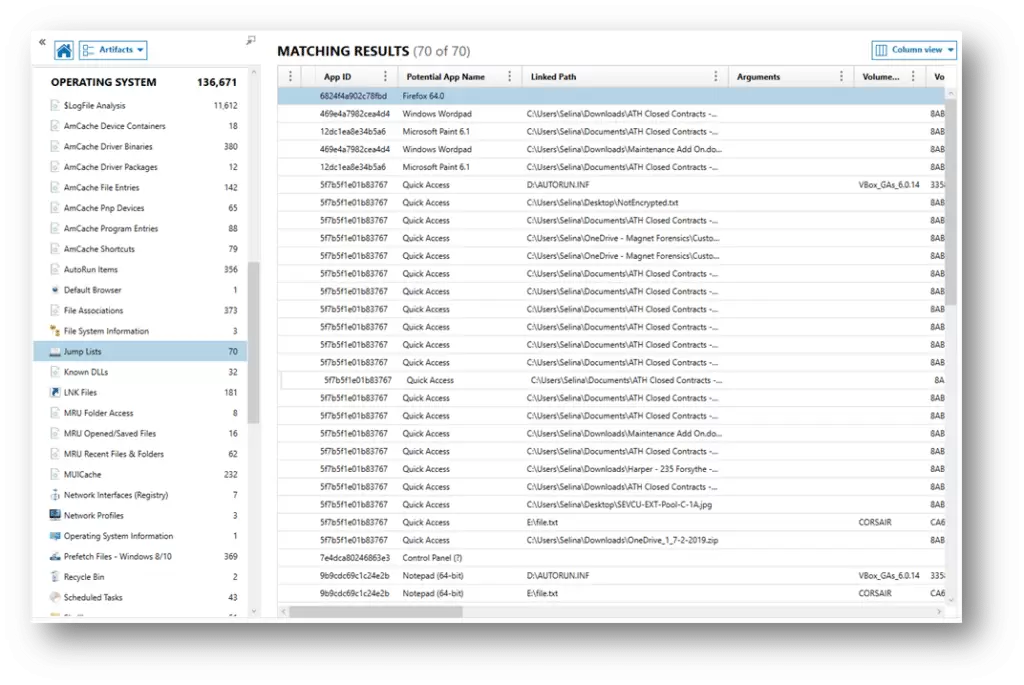
A prime example of this is a recent investigation focused on an individual and his “deleted” files. The subject stated that he did not have the files in question, nor had he had access to them. Although the files were not found on the device, the jump list showed that the suspect had opened the file using a computer program. The investigation also revealed that the file had been saved to an external USB. Further analysis showed that the suspect had verified his personal bank account five minutes before opening the file and then sent an email (to his mother) shortly after accessing the file in question. Magnet Axiom does a tremendous job of splitting jump list items. As seen in this example, an entry for “Jump Lists” can be found in the Artifacts panel in Operating System.

Magnet Axiom will also break down access to the Most Recently Used (MRU) folder, MRU opened/saved files, and MRU recent files and folders. These can be found just below the Jump List artifact.
Using Magnet's Axiom, jump lists can be recovered by analyzing the image. Axiom retrieves a huge amount of relevant artifact information. Some of these artifacts include:
[table id=10 /]
Skip list analysis is a tremendously powerful asset in the digital forensic investigators' toolkit. From reconstructing timelines, profiling user activities, correlating with other artifacts, and establishing user attribution, skip lists enhance the investigation process. Forensic professionals are encouraged to explore, refine, and integrate skip list analysis methodologies to unlock the valuable insights they contain within the maze of user interactions on Windows-based computing systems.
read it inmagnetforensics.com